What Is an Audio Interface and Why Do You Need One?
What Is an Audio Interface?
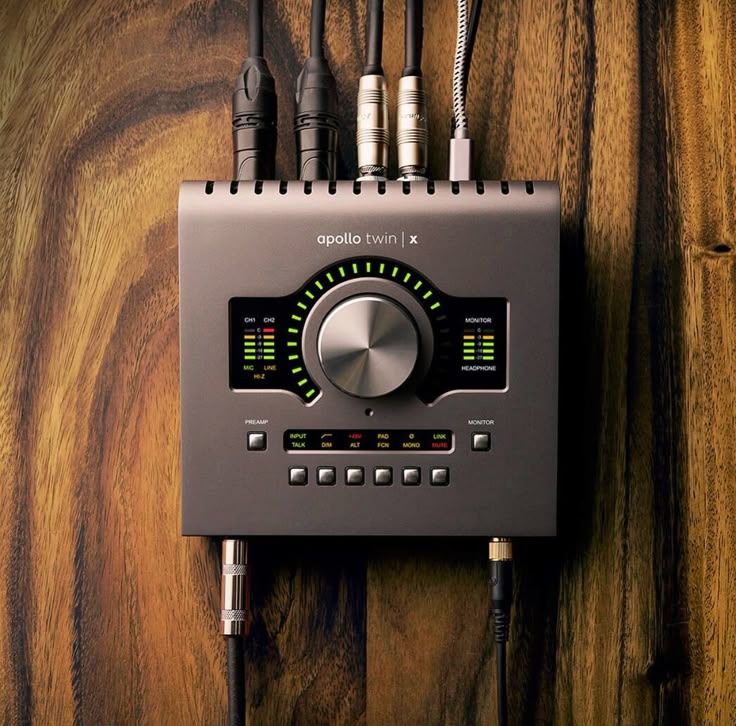
An audio interface is a piece of hardware used for recording and playback of audio.
It acts as a bridge between your physical audio equipment and your computer.
For example, if you want to record vocals, the microphone produces an analog electrical signal.
The audio interface converts that signal into digital data that your computer and DAW can understand.
During playback, the process works in reverse.
The interface converts digital audio from the computer back into an analog signal that your headphones or speakers can reproduce.
How Does an Audio Interface Work?
An audio interface performs several important jobs.
1. Analog-to-Digital Conversion
When you record a microphone or instrument, the signal is analog.
The interface converts it into digital audio.
This process is called:
ADC — Analog-to-Digital Conversion
The digital signal can then be recorded inside your DAW.
2. Digital-to-Analog Conversion
When you play your project, the DAW sends digital audio to the interface.
The interface converts it back into an analog signal.
This is called:
DAC — Digital-to-Analog Conversion
The signal can then be sent to:
- Studio monitors
- Headphones
- External equipment
Why Do You Need an Audio Interface?
An audio interface becomes important when you want to connect professional audio equipment to your computer.
Main Benefits
Better Recording
A good interface provides clean microphone and instrument inputs.
Better Monitoring
You can connect professional headphones and studio monitors directly.
Lower Latency
Audio interfaces can provide lower monitoring latency, which is important when recording vocals or instruments.
More Inputs and Outputs
You can connect multiple microphones, instruments, synthesizers, and other equipment.
Better Connectivity
An interface provides connections designed specifically for audio production.
What Can You Connect to an Audio Interface?
An audio interface can connect many types of equipment.
Microphones
You can connect:
- Dynamic microphones
- Condenser microphones
- Some ribbon microphones
For condenser microphones, you may need 48V phantom power.
Instruments
Many interfaces include instrument inputs for:
- Electric guitar
- Bass guitar
- Synthesizers
- Keyboards
An instrument input is commonly called an Hi-Z input.
Studio Monitors
Your interface can send audio to professional studio monitors.
Typical connections include:
- TRS
- XLR
- RCA
The exact connection depends on the interface and speakers.
Headphones
Most interfaces include a dedicated headphone output.
This allows you to monitor recordings without disturbing others.
What Is Phantom Power?
If you use a condenser microphone, you may see a button labeled:
48V
This is phantom power.
Phantom power supplies the electrical power required by many condenser microphones.
Important
Always check your microphone’s requirements before enabling phantom power.
Do not assume every microphone needs it.
What Are the Main Parts of an Audio Interface?
Understanding the front and back panels makes an interface much easier to use.
Front Panel
You may find:
- Microphone inputs
- Gain controls
- Headphone output
- Headphone volume
- Instrument input
- 48V phantom power
- Input meters
Back Panel
Depending on the model, you may find:
- Monitor outputs
- Line outputs
- MIDI connections
- Digital inputs and outputs
- USB or Thunderbolt connection
What Is Gain on an Audio Interface?
Gain controls the amount of amplification applied to the incoming microphone or instrument signal.
This is different from the volume control of your speakers or headphones.
For recording, you want a healthy signal without clipping.
Basic Recording Rule
Set the gain so your loudest performance has enough headroom and does not reach digital clipping.
Watch your DAW’s input meter while the performer records.
Audio Interface vs Computer Sound Card
These two devices perform similar basic functions, but they are designed for different purposes.
Computer Sound Card | Audio Interface |
|---|---|
| Designed for general computer audio | Designed for music and audio production |
| Limited inputs | Multiple professional inputs available |
| Basic microphone connectivity | XLR/TRS microphone and instrument connections |
| Limited monitoring options | Dedicated headphone and monitor outputs |
| Less flexible | Designed for studio workflows |
For serious recording and music production, an audio interface is usually the more practical choice.
Do You Need an Audio Interface for Music Production?
Not always.
If you only use:
- Software instruments
- MIDI keyboards
- Headphones
- Virtual effects
you can technically produce music without an audio interface.
However, an interface becomes highly useful when you want to:
- Record vocals
- Record guitars
- Record instruments
- Connect studio monitors
- Record synthesizers
- Use professional microphones
- Build a recording studio
How to Choose an Audio Interface
Choosing an interface depends on your workflow.
1. Number of Inputs
Think about what you need to record.
For example:
Solo Producer
A 1–2 input interface may be enough.
Vocalist + Guitarist
Two inputs may be useful.
Full Band
You may need 8 or more microphone inputs.
2. Number of Outputs
More outputs become useful when connecting:
- Studio monitors
- Headphone amplifiers
- External hardware
- Multiple monitoring systems
3. Connection Type
Common computer connections include:
- USB
- USB-C
- Thunderbolt
Check compatibility with your computer before purchasing.
4. Preamp Quality
Microphone preamps amplify the relatively weak signal coming from a microphone.
A good preamp should provide clean amplification with low unwanted noise.
How to Connect an Audio Interface
A basic setup is straightforward.
Step 1
Connect the interface to your computer.
Step 2
Install the required software or drivers if necessary.
Step 3
Connect your microphone or instrument.
Step 4
Connect your headphones or studio monitors.
Step 5
Select the interface as the audio device in your DAW.
Step 6
Set the correct input on your recording track.
Step 7
Adjust the gain and check your input meter.
Step 8
Record a test signal before starting the actual session.
Common Mistakes Beginners Should Avoid
Setting Gain Too High
This can cause clipping and distortion.
Forgetting Phantom Power
A condenser microphone may not work correctly without the required power.
Connecting Monitors Incorrectly
Always check the correct output connections and routing.
Ignoring Buffer Settings
Incorrect buffer settings can cause unnecessary latency or audio glitches.
Buying More Inputs Than You Need
Choose an interface based on your actual recording requirements.
Audio Interface in a Home Studio Setup
A basic home studio signal chain might look like this:
Microphone → Audio Interface → DAW → Audio Interface → Studio Monitors
For a guitar:
Guitar → Hi-Z Input → Audio Interface → DAW → Headphones
For a synthesizer:
Synthesizer → Line Input → Audio Interface → DAW
Understanding this signal flow is an essential skill for anyone learning music production or sound engineering.
Audio Interface Signal Flow
Microphone → Preamp → ADC → Computer → DAW → DAC → Headphones / Monitors
Comparison Chart
Which Interface Do You Need?
| User | Recommended Input Range |
| Beginner producer | 1–2 inputs |
| Singer-songwriter | 2 inputs |
| Small recording setup | 4 inputs |
| Band recording | 8+ inputs |
| Larger studio | 16+ inputs |
Why Learn Audio Interfaces and Signal Flow?
Understanding your equipment is just as important as learning your DAW.
At Mindwork School of Music, students learn practical concepts such as:
- Audio interfaces
- Signal flow
- Microphone techniques
- Recording
- DAW workflow
- Mixing and mastering
- Studio equipment
Understanding how audio moves from a microphone to your DAW gives you a strong foundation in music production and sound engineering.
Frequently Asked Questions (FAQs)
What does an audio interface do?
An audio interface connects microphones and instruments to your computer while converting analog audio into digital audio and digital audio back into analog audio.
Do I need an audio interface to make music?
Not necessarily. You can produce music using software instruments without one. However, an audio interface is highly useful for recording microphones, instruments, and connecting studio monitors.
Is an audio interface better than a computer headphone jack?
For music production and recording, an audio interface generally provides more suitable inputs, outputs, monitoring options, and professional audio connectivity.
Can I connect a microphone directly to my computer?
Some USB microphones can connect directly to a computer. Traditional XLR microphones normally require an audio interface or another suitable preamp/converter.
What is 48V phantom power?
48V phantom power supplies electrical power to many condenser microphones through the microphone cable.
How many inputs do I need on an audio interface?
It depends on your recording needs. A solo producer may only need one or two inputs, while a band or larger recording setup may require eight or more.
Does an audio interface reduce latency?
A suitable audio interface and properly configured DAW can provide low-latency monitoring. Actual latency also depends on buffer size, computer performance, drivers, sample rate, and the audio software being used.
Can I connect a MIDI keyboard to an audio interface?
Some audio interfaces include MIDI ports, allowing MIDI devices to be connected directly. However, many modern MIDI keyboards can connect directly to the computer through USB.
Is an audio interface necessary for studio monitors?
You can connect some monitors directly to a computer using appropriate outputs, but an audio interface provides a more flexible and professional monitoring setup for a home studio.